
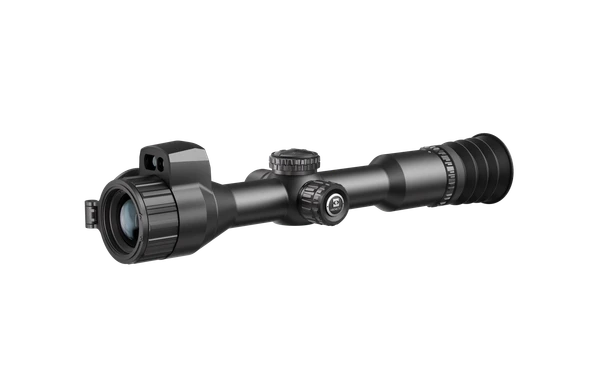
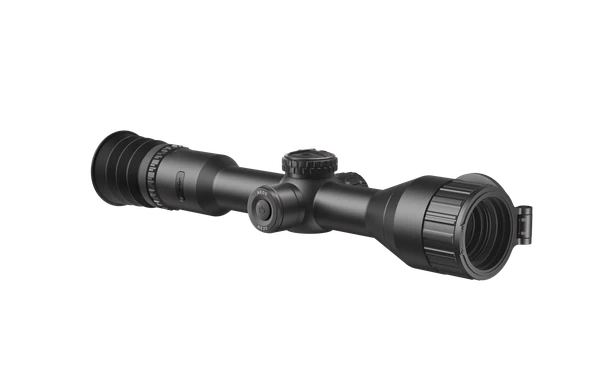
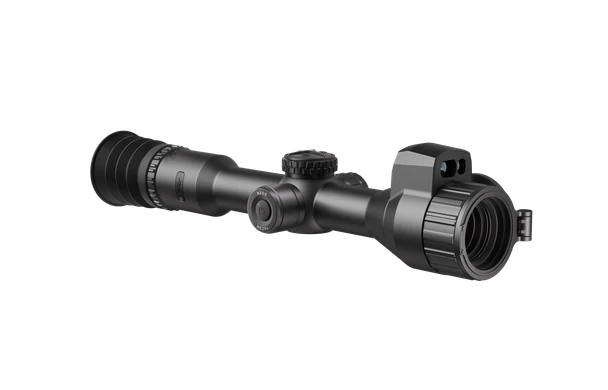

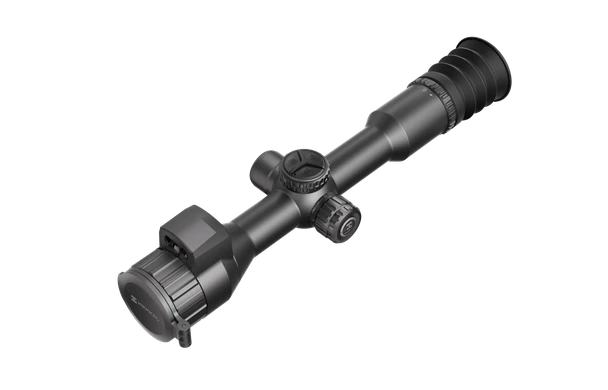
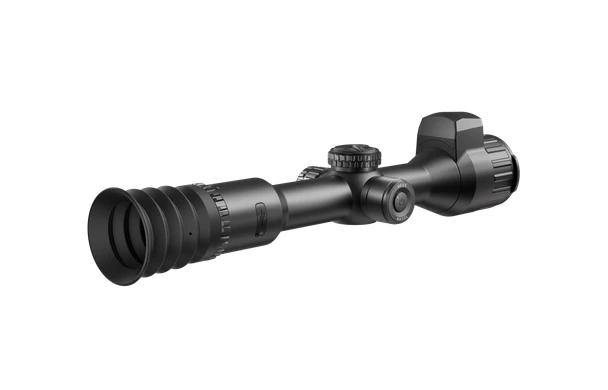
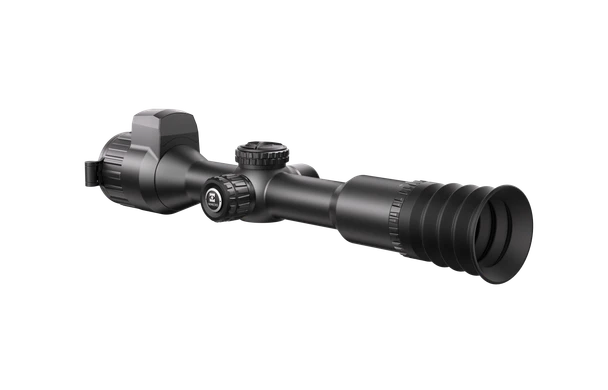
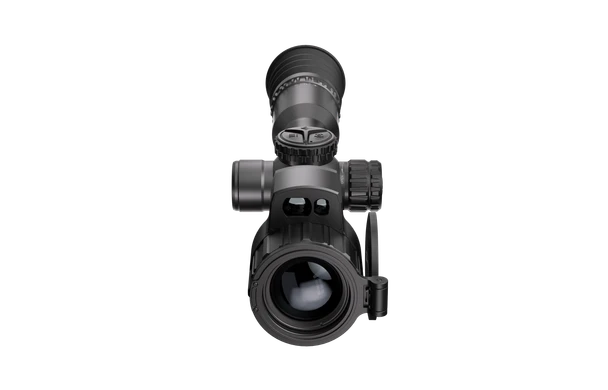
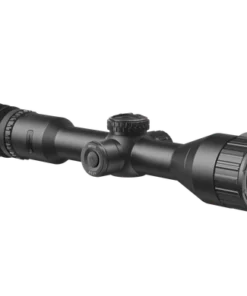
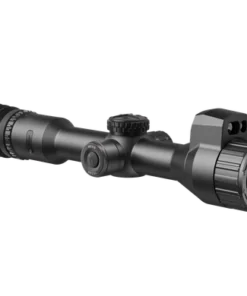
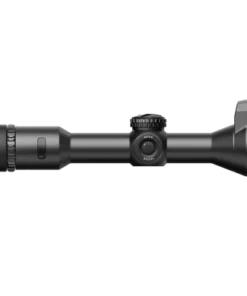

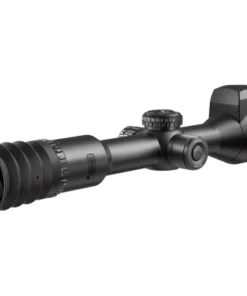
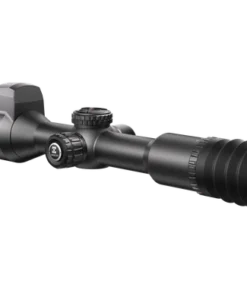
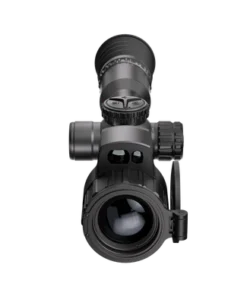
HIKMicro Neos

Price range: €550.00 through €1,250.00
HIKMICRO has broken the mould yet again with the HIKMICRO NEOS thermal rifle scope. NEOS packages legendary HIKMICRO thermal technology trickled down from the stellar 3.0, with HSIS shutterless technology, Image Pro 3 & Sync Pro algorithm inside the lightest and most compact tube-style thermal rifle scope ever. All of this is delivered at incredibly affordable price points!
HIKMICRO NEOS NE25 Thermal Image Scope is equipped with a 256×192 resolution and a NETD < 18 mK thermal detector. The advanced Image Pro 3.0 algorithm, shutterless system (HSIS), and Sync Pro algorithm ensure users capture seamless, detailed images with lower latency. With a 0.49″ AMOLED display, NE25 offers an immersive viewing experience.
Key Feature
- High sensitivity thermal module NETD < 18 mK (@25°C, F# = 1.0)
- HIKMICRO Shutterless Image System (HSIS) & Zoom Pro
- 0.49” AMOLED Large Display
- 540g lightweight, with a compact and ergonomic design
- 1-second Quick Start-up
- 9.5-hour Operation Time
- Quick Zeroing on Sight APP
HIKMICRO NEOS NH25L Thermal Image Scope boasts 320×240 resolution and is equipped with a NETD<18mK thermal detector. The advanced Image Pro 3.0 algorithm, shutterless system (HSIS), and Sync Pro algorithm ensure users capture seamless, detailed images with lower latency. With a 0.49″ AMOLED display, NH25L offers an immersive viewing experience. The laser rangefinder and ballistic calculation contribute to more accurate shooting.
Key Feature
- High sensitivity thermal module NETD < 18 mK (@25°C, F# = 1.0)
- HIKMICRO Shutterless Image System (HSIS) & Zoom Pro
- 0.49” AMOLED Large Display
- 550g lightweight, with a compact and ergonomic design
- 1000m Laser Rangefinder with Ballistic Calculation
- 1-second Quick Start-up
- 9-hour Operation Time
- Quick Zeroing on Sight APP
HIKMICRO NEOS NH35L Thermal Image Scope is equipped with a 384×288 @12 μm (NETD < 18 mK) thermal detector. Its advanced Image Pro 3.0 algorithm, shutterless system (HSIS), and Sync Pro algorithm ensure users capture seamless, detailed images with lower latency. With a 0.49″ AMOLED display, NH35L offers an immersive viewing experience. The laser rangefinder and ballistic calculation contribute to more accurate shooting.
Key Feature
- High sensitivity thermal module NETD < 18 mK (@25°C, F# = 1.0)
- HIKMICRO Shutterless Image System (HSIS) & Zoom Pro
- 0.49” AMOLED Large Display
- 570g lightweight, with a compact and ergonomic design
- 1000m Laser Rangefinder with Ballistic Calculation
- 1-second Quick Start-up
- 8-hour Operation Time
- Quick Zeroing on Sight APP
HIKMicro NEOS Thermal Scope – Advanced Thermal Imaging, Integrated Rangefinding, Ballistic Support, and Precision Optics
The HIKMicro NEOS is a modern thermal riflescope platform developed around continuous thermal imaging, straightforward controls, ballistic support, strong environmental protection, and a conventional 30 mm mounting format. The current family includes the NE25, NH25L, and NH35L, allowing users to choose between different thermal resolutions, focal lengths, detection ranges, magnification ranges, and integrated rangefinder capability.
The flagship NH35L uses a 384 × 288 VOx thermal sensor, 12 μm pixel pitch, less than 18 mK NETD, 35 mm F1.0 objective, 50 Hz refresh rate, and up to 1800 m detection range. The NH25L uses a 320 × 240 sensor with a 25 mm F1.0 lens and up to 1200 m detection, while the NE25 uses a 256 × 192 sensor with the same 25 mm focal length and 1200 m published detection range.
Across the range, HIKMicro incorporates a 1920 × 1080 AMOLED display, multiple thermal palettes, Image Pro 3.0, Zoom Pro, HSIS shutterless imaging, picture-in-picture, recording, image capture, 64 GB internal storage, recoil-activated recording, freeze zeroing, and five zeroing profiles.
sniper hider
The phrase sniper hider generally relates to camouflage or visual-signature accessories rather than thermal imaging technology. It is not an integrated NEOS feature.
optics warehouse
Searches for optics warehouse often involve comparison shopping across conventional, digital, night-vision, and thermal optics. NEOS belongs specifically to the thermal riflescope category.
red dot uk
The phrase red dot uk normally refers to unmagnified reflex sights. NEOS instead provides magnified thermal imaging and electronic reticle functionality.
picatinny
A picatinny rail is a standardized accessory interface. NEOS itself uses a traditional 30 mm tube-style mounting arrangement, so appropriate compatible rings are required.
bipod for rifle
A bipod for rifle provides mechanical shooting support but is separate from the thermal optic.
ir illuminator
An ir illuminator is normally associated with digital night vision. Thermal imaging detects emitted infrared heat and does not require an IR illuminator to produce a thermal image.
minotaur 10-50×60
The minotaur 10-50×60 is a conventional high-magnification optical scope category and should not be confused with a digital thermal sight.
picatinny dimensions
Searches for picatinny dimensions concern rail geometry and slot spacing. These dimensions matter when choosing mounting accessories but are separate from the internal thermal system.
scope mount
A compatible scope mount is critical because the NEOS uses a standard 30 mm mounting format. Correct ring height, secure installation, and proper alignment help maintain repeatable zero.
zero stop scope
A zero stop scope normally refers to a mechanical turret system. NEOS instead uses digital zeroing functions, including freeze zeroing and multiple stored profiles.
optic warehouse
The phrase optic warehouse is commonly used when comparing multiple optic technologies. Thermal, digital night vision, and conventional glass scopes should always be evaluated as separate categories.
what is a picatinny rail
The question what is a picatinny rail refers to a standardized accessory rail with repeated transverse slots for mounting compatible equipment.
parker hale scope rings for sale
The phrase parker hale scope rings for sale relates to traditional mounting hardware. NEOS requires mounting hardware compatible with its 30 mm body.
swfa ss 10×42
The swfa ss 10×42 is a conventional fixed-power optic and differs fundamentally from a thermal imaging scope.
delta stryker
The delta stryker belongs to the conventional riflescope category, whereas NEOS creates an electronic image from thermal radiation.
prs spotting scope setups
prs spotting scope setups are normally designed for observation and shot spotting. NEOS is intended as a weapon-mounted thermal sight rather than a dedicated spotting scope.
1913 rail
A 1913 rail is another common name for the MIL-STD-1913 Picatinny interface.
what is zero stop on a scope
The question what is zero stop on a scope usually refers to a turret mechanism that prevents adjustment below a preset zero. NEOS uses electronic zeroing instead of a conventional mechanical zero-stop turret.
difference between weaver and picatinny rail
The difference between weaver and picatinny rail mainly concerns standardized slot dimensions and spacing. Mount compatibility should always be verified before installation.
scope illumination
Traditional scope illumination lights the reticle. NEOS instead uses a digital display where reticle information and thermal imagery are generated electronically.
what is parallax in optics
The question what is parallax in optics concerns apparent reticle movement relative to the target when the viewing eye shifts. Thermal scopes use electronic displays, but correct focus and consistent eye position still matter.
ballistic solver
A ballistic solver calculates projectile trajectory based on entered shooting parameters. The NH25L and NH35L include ballistic calculation functionality together with laser rangefinding.
delta optics
delta optics represents another optics family and should be compared according to use case rather than assumed to share thermal technology.
element optics
element optics is associated mainly with conventional riflescope systems, while NEOS belongs to the electronic thermal category.
schmidt and bender scopes
schmidt and bender scopes are premium conventional optical scopes. Their glass-based daytime performance is fundamentally different from thermal imaging.
best rifle bipod for long range shooting
The best rifle bipod for long range shooting depends on rifle weight, terrain, shooting position, and stability requirements. Bipod selection remains separate from thermal optic performance.
chrony chronograph
A chrony chronograph measures projectile velocity. It can provide useful ballistic data, but it is not part of the NEOS imaging system.
hikmicro stellar sx60l thermal scope
The hikmicro stellar sx60l thermal scope belongs to another HIKMicro thermal family. NEOS is positioned as a newer thermal-scope platform with different sensor, housing, power, and feature configurations.
best digital night vision scope
The best digital night vision scope uses amplified visible and near-infrared light rather than heat detection. Thermal imaging can continue identifying temperature differences when visible light is extremely limited.
march riflescope adjustments argon filled d42hv56wfml g2
The phrase march riflescope adjustments argon filled d42hv56wfml g2 relates to premium conventional optical scope construction and mechanical turret adjustment rather than digital thermal imaging.
dnt optics review
A dnt optics review may involve thermal or digital optics comparisons. Sensor specification, display quality, software, battery architecture, image processing, and rangefinding should all be compared carefully.
falcon optics
falcon optics is associated with conventional optical sights rather than this thermal platform.
best night vision scope
The best night vision scope depends on whether the user needs digital low-light imaging or thermal detection. These technologies solve different visibility problems.
what is parallax in a scope
The question what is parallax in a scope describes an apparent aiming error caused when the target and reticle image planes are not aligned.
zco optics
zco optics refers to premium conventional precision scopes. NEOS instead provides digitally generated thermal imagery.
what is parallax in a rifle scope
The question what is parallax in a rifle scope is important for understanding conventional optics, although thermal sights rely on electronic image processing rather than a traditional optical reticle system.
tnc225r review
A tnc225r review typically concerns another thermal or digital optic platform. Comparison should focus on sensor sensitivity, detection distance, display quality, power system, and user interface.
tactical rail
A tactical rail provides mounting space for accessories. NEOS installation should use properly sized rings and a secure compatible base.
swfa scope review
A swfa scope review normally evaluates conventional glass optics, mechanical turrets, tracking, and reticle design rather than thermal detection.
scope torque wrench
A scope torque wrench can help apply manufacturer-specified mounting torque consistently. Over-tightening rings can damage optic housings, so mounting instructions should always be followed.
tpo scopes
tpo scopes should be assessed according to their particular optical technology and intended use rather than compared solely by magnification.
best scope for air rifle
The best scope for air rifle depends on recoil characteristics, mounting system, shooting environment, weight, and intended range. Thermal optics are most useful when heat detection is specifically required.
what is the moa of a scope
The question what is the moa of a scope concerns angular adjustment. NEOS specifies digital click value as 1 cm at 100 m per click rather than describing adjustment only in traditional MOA terminology.
optics planet
optics planet is commonly associated with broad optics searches, but individual specifications should always be verified against the manufacturer.
dnt thermal scope review
A dnt thermal scope review may be useful for comparing another thermal platform against NEOS based on sensor resolution, sensitivity, image processing, rangefinding, battery life, and software.
vector minotaur 10 50×60
The vector minotaur 10 50×60 is a high-magnification conventional scope and therefore serves a different visual role from thermal imaging.
picatinny scope base
A picatinny scope base can provide a strong standardized mounting foundation when paired with compatible 30 mm rings.
High-Sensitivity Thermal Sensor
The NEOS family uses VOx uncooled focal-plane arrays with 12 μm pixel pitch and less than 18 mK NETD. Lower NETD values improve the device’s ability to distinguish small temperature differences, helping preserve target and background detail in difficult thermal conditions.
50 Hz Refresh Rate
All current NEOS models use a 50 Hz refresh rate, providing smooth image movement during scanning and target tracking.
HSIS Shutterless Technology
HIKMicro’s HSIS shutterless imaging system is intended to maintain uninterrupted thermal viewing without the obvious freezing associated with traditional calibration events. This helps maintain visual continuity while observing moving scenes.
Image Pro 3.0
Image Pro 3.0 enhances image processing and perceived detail, helping improve separation of thermal subjects from complex backgrounds.
Zoom Pro
Zoom Pro is designed to preserve useful image quality as digital magnification increases.
Sync Pro
Sync Pro is included on the current NEOS family and forms part of HIKMicro’s integrated image-processing architecture.
Integrated Laser Rangefinder
The NH25L and NH35L include a Class 1, 905 nm laser rangefinder with a published measuring range from 10 m to 1000 m and ±1 m stated accuracy.
Ballistic Calculation
Ballistic calculation is available on the rangefinder-equipped versions. Combined with measured distance, it can provide additional aiming information once appropriate ballistic data has been entered.
1920 × 1080 AMOLED Display
The 0.49-inch 1920 × 1080 AMOLED display provides a high-resolution viewing interface for thermal imagery, menu information, reticles, recorded content, and system settings.
Multiple Thermal Palettes
Available viewing modes include Black Hot, White Hot, Red Hot, Fusion, Red Monochrome, and Green Monochrome. Different palettes can improve visual comfort or target-background separation depending on the environment.
64 GB Internal Storage
Built-in 64 GB EMMC storage supports video recording, snapshots, audio recording, and local file review.
Recoil-Activated Recording
Recoil-activated recording allows the device to automatically capture footage around the firing event, reducing the need to manually begin every recording.
Five Zeroing Profiles
Up to five zeroing profiles are supported, allowing different saved configurations to be retained within the device.
Dual Battery Architecture
The system combines an internal rechargeable battery with a removable rechargeable 18650 external battery. HIKMicro lists operating times of approximately 8 to 9.5 hours depending on model and enabled functions.
IP67 Environmental Protection
The housing carries an IP67 protection rating, providing strong resistance to dust and temporary water exposure. The published operating temperature range extends from approximately -30°C to 55°C.
Why Should You Consider HIKMicro NEOS?
The strongest reasons include sensitive thermal detection, continuous shutterless viewing, modern image enhancement, conventional 30 mm mounting, long operating time, onboard recording, multiple zero profiles, weather resistance, and integrated rangefinding on selected models.
How Good Is the Image Precision?
Image precision depends on the selected model. The NH35L offers the highest sensor resolution within the range at 384 × 288, while the less expensive versions use lower-resolution detectors. All three combine sub-18 mK sensitivity with 12 μm sensors and 50 Hz refresh rates.
Where Is It Best Used?
NEOS is designed for lawful thermal observation and permitted sporting applications in environments where heat-based detection provides an advantage over conventional visible-light optics.
When Does Thermal Imaging Make Sense?
Thermal imaging becomes particularly valuable in darkness, low contrast, vegetation, foggy-looking backgrounds, or situations where a warm subject is difficult to distinguish using visible light alone.
Important Technical Information
The NH35L combines a 384 × 288 sensor, 35 mm F1.0 objective, 3.2×–25.6× magnification, 1800 m published detection range, integrated 1000 m rangefinder, 570 g weight, and approximately eight hours of listed runtime under stated test conditions. The NH25L uses a 320 × 240 sensor with 25 mm optics, 3.5×–24.5× magnification, 1200 m detection, integrated rangefinder, and approximately nine hours of operating time. The NE25 uses a 256 × 192 sensor, 25 mm lens, 1200 m detection, 3.5×–24.5× magnification, no integrated laser rangefinder, and approximately 9.5 hours of listed runtime.
Overall Precision and Practical Value
HIKMicro NEOS combines thermal sensitivity, modern electronic image processing, digital zeroing, recording, strong environmental protection, and a familiar riflescope-style mounting system. The rangefinder-equipped models add distance measurement and ballistic calculation, while the entry configuration retains the core thermal imaging and recording architecture at lower complexity.
For users who need a thermal sight rather than a conventional glass optic or digital night-vision scope, the NEOS family provides a technically capable platform with multiple performance levels and a strong emphasis on continuous imaging, practical battery management, and straightforward field operation.
Section 2 – Thermal Imaging Performance, Sensor Quality, Display Clarity, Rangefinding, Controls, Power Management, and Reliability
Overall Imaging Performance
A modern thermal sight is judged primarily by how effectively it detects heat, separates targets from the surrounding environment, maintains image stability, and presents information clearly through the display.
Sensor quality, thermal sensitivity, focal length, refresh rate, image processing, digital magnification, display resolution, and environmental conditions all influence the final viewing experience.
Thermal Sensor Quality
The thermal detector is the foundation of the imaging system.
A higher-quality sensor can provide better target definition and more useful background detail, especially when temperature differences are small.
This becomes particularly important during difficult weather conditions or when the subject and surroundings have similar thermal signatures.
Thermal Sensitivity
High thermal sensitivity allows the device to distinguish smaller differences in temperature.
Therefore, fine details can remain visible even when contrast is limited.
Lower thermal sensitivity figures generally indicate stronger ability to identify subtle heat variation.
Pixel Pitch
Pixel pitch affects how thermal information is captured by the sensor.
A smaller pitch can help maintain a compact optical design while supporting useful detail.
However, sensor resolution and image processing remain equally important when evaluating overall performance.
Refresh Rate
A high refresh rate creates smoother movement on the display.
This is especially useful when scanning, following moving animals, or shifting quickly between different parts of a scene.
Smooth refresh behavior can also reduce visual fatigue during longer observation periods.
Image Processing
Modern thermal imaging depends heavily on digital processing.
The processor must balance sharpness, edge definition, contrast, noise reduction, and background detail.
Strong processing can make a modest sensor appear noticeably more informative under difficult conditions.
Detail Enhancement
Image-enhancement software can help improve subject separation.
Edges may appear clearer, while small differences between warm and cool areas can become easier to interpret.
This is particularly useful when vegetation or uneven terrain creates a complex thermal background.
Digital Magnification
Digital zoom enlarges the electronically generated image rather than changing optical focal length.
As magnification increases, visible pixel structure can become more noticeable.
Good processing helps preserve usable detail, although maximum digital enlargement should not be confused with true optical resolution.
Display Quality
The internal display is the shooter’s primary interface with the thermal image.
High display resolution improves menu readability, reticle clarity, image review, and perceived detail.
A quality display can also improve comfort during prolonged use.
Contrast Management
Contrast settings influence how clearly hot and cool areas are separated.
Higher contrast can make a warm subject stand out strongly, while lower contrast may preserve more environmental detail.
The best setting depends on terrain and temperature conditions.
Brightness Control
Display brightness should be adjusted for the environment.
Excessive brightness can cause eye fatigue in darkness.
A more moderate setting usually provides sufficient visibility while preserving night adaptation.
Thermal Color Modes
Different display palettes can change how thermal information is interpreted.
Some users prefer bright warm targets against dark backgrounds, while others find inverted or color-based modes easier to read.
The best choice is largely personal and situation dependent.
Shutterless Viewing
A shutterless thermal system can improve continuity during observation.
Traditional thermal devices may briefly freeze the image during calibration.
Continuous viewing reduces interruption and can make moving scenes feel more natural.
Detection Versus Identification
Detection range and identification range are not the same measurement.
A device may detect the presence of a heat source at a considerable distance while providing insufficient detail for confident identification.
Therefore, published detection figures should not be interpreted as guaranteed recognition distance.
Practical Detection Conditions
Real-world detection performance depends on temperature, humidity, rain, fog, terrain, vegetation, subject size, and background conditions.
Performance may vary significantly between a cold winter evening and a warm summer night.
Focal Length
Longer focal lengths generally provide a narrower field of view and greater apparent target size.
Shorter focal lengths provide wider situational awareness.
Choosing between them depends on whether scanning or more distant observation is the priority.
Field of View
A wider field of view makes scanning large areas easier.
It also helps maintain awareness of movement outside the center of the image.
A narrower field provides greater apparent magnification but requires more deliberate scanning.
Focus Adjustment
Correct objective focus is important for obtaining the clearest thermal image.
Focus should be adjusted whenever target distance changes significantly.
Poor focus can make a high-quality sensor appear softer than it actually is.
Eyepiece Adjustment
The eyepiece should be adjusted so the display and reticle appear sharp to the individual user.
Once set correctly, frequent readjustment is generally unnecessary.
A clear eyepiece setting reduces eye strain.
Range Measurement
Integrated distance measurement can provide useful information when determining how far away a visible heat source is.
Accurate range information is particularly valuable because estimating distance through a thermal image can be difficult.
Rangefinding Conditions
Laser ranging performance can be affected by target reflectivity, weather, angle, and environmental interference.
Large reflective objects are generally easier to measure than small or poorly reflective targets.
Users should treat range readings as measurement data rather than visual estimates.
Ballistic Calculation
Built-in trajectory calculation can process entered projectile information together with measured distance.
However, the quality of the result depends entirely on accurate input data.
Incorrect velocity, sight height, projectile characteristics, or zero information will produce inaccurate output.
Zeroing System
Digital zeroing allows the reticle position to be adjusted electronically.
A stable mounting system remains essential because software cannot compensate for a physically moving optic.
Zero should always be confirmed after mounting changes.
Multiple Profiles
Stored profiles can make the device more flexible when used with different approved configurations.
Each profile should be clearly identified to avoid selecting the wrong settings.
Users should verify the active profile before shooting.
Freeze-Zero Function
A freeze function can simplify adjustment by holding a captured image while the reticle is repositioned.
This can reduce unnecessary repeated aiming movements.
The feature is primarily designed to make the zeroing process more convenient.
Reticle Visibility
Reticle design should remain clearly visible against both hot and cool backgrounds.
Different styles and colors may provide better contrast under changing thermal conditions.
A cluttered reticle can obscure small targets.
Recording Function
Integrated video recording allows thermal observations to be stored for later review.
Recorded footage can help evaluate image quality and document field observations.
Available storage should be monitored during extended use.
Image Capture
Still-image capture provides a quick way to save important observations without recording long video clips.
Images can later be reviewed for target identification, environmental comparison, or equipment evaluation.
Internal Storage
Large internal storage capacity reduces the need for frequent file transfers.
However, stored footage should still be backed up periodically.
Deleting unnecessary recordings helps maintain available space.
Recoil-Activated Recording
Automatic recording triggered by firing can capture important moments without requiring manual operation.
This can be useful when attention needs to remain focused on the scene rather than menu controls.
Control Layout
Physical controls should be easy to identify by touch.
Logical button placement becomes particularly important in darkness.
Simple controls reduce the amount of time spent navigating menus.
Menu Navigation
A clear menu structure makes frequently used settings easier to access.
Brightness, focus-related options, image modes, recording, and zeroing functions should be familiar before field use begins.
Battery Architecture
A combination of internal and replaceable power sources can provide greater flexibility.
The removable battery can be replaced when depleted, while the internal supply may allow continued operation during the change.
Battery Runtime
Actual battery life varies according to display brightness, wireless connectivity, recording, temperature, and rangefinder use.
Cold weather can reduce runtime.
Carrying a charged spare battery is useful during extended sessions.
Charging Routine
Compatible charging equipment should be used.
Batteries should not be charged if damaged, swollen, or unusually hot.
Proper charging practices help extend battery life.
Cold-Weather Performance
Low temperatures can reduce battery efficiency.
Keeping spare batteries protected from extreme cold can help preserve capacity.
The device itself should also be allowed to acclimatize when moving between significantly different temperatures.
Water and Dust Protection
Strong environmental sealing is valuable for equipment intended for outdoor use.
Rain, dust, and muddy conditions can occur unexpectedly.
However, weather resistance should not be interpreted as permission for unnecessary submersion or neglect.
Lens Protection
The front lens should remain clean and protected.
Dirt, fingerprints, moisture, and abrasive particles can degrade image quality.
A suitable lens cloth should be used rather than rough materials.
Housing Inspection
The housing should be checked periodically for cracks, damaged controls, loose covers, or worn seals.
Physical damage can compromise environmental protection even if the electronics continue functioning.
Mounting Stability
The sight should remain securely attached to its mounting system.
Loose rings or bases can cause zero shift.
Mounting hardware should therefore be checked periodically.
Transport Protection
During transport, the device should be protected from impact, excessive heat, moisture, and pressure from other equipment.
A padded case helps protect the lens, display, controls, and mounting area.
Software Updates
Firmware updates may improve system stability, compatibility, or functionality.
Only official software and approved update procedures should be used.
Interrupting an update can create operating problems.
Connectivity
Wireless connectivity can simplify file transfer and device management.
However, unnecessary wireless functions can consume additional battery power.
Disabling them when not required can improve runtime.
Long-Term Reliability
Long-term performance depends on healthy batteries, secure mounting, clean optics, intact seals, stable software, careful charging, and appropriate storage.
When these areas are maintained consistently, the thermal system can continue providing clear imaging, dependable detection, useful range information, and reliable field performance across extended ownership.
Section 3 – Practical Field Use, Image Interpretation, Mounting Stability, Battery Management, Environmental Performance, and Everyday Operation
Practical Field Experience
A modern thermal sight is most useful when its controls, image processing, mounting system, and power supply work together without distracting the user.
In practical use, the best performance usually comes from careful setup rather than constant adjustment. Once focus, display brightness, reticle preference, zero profile, and power settings have been established, the device can be operated quickly and consistently.
Thermal Scanning
Thermal imaging allows warm objects to stand out from cooler surroundings, especially in darkness or low-visibility environments.
Scanning should be performed steadily rather than too quickly.
Slow movement gives the display time to present more usable detail and makes smaller heat signatures easier to notice.
Target Separation
Clear separation between a warm subject and the background depends on temperature contrast.
Cold ground, shaded vegetation, and cool air often create strong separation.
Warm weather can reduce that contrast, which means image interpretation becomes more important.
Reading Thermal Detail
A bright thermal signature does not always reveal identity immediately.
Shape, movement, size, position, and surrounding context should all be considered.
Reliable identification requires more than simply seeing a heat source.
Detection Versus Recognition
Detection means noticing that something warm is present.
Recognition means understanding what category the object belongs to.
Identification requires enough detail to distinguish the exact subject confidently.
These distances are often very different.
Focusing Technique
Correct focus is essential for extracting useful detail from the sensor.
The objective should be adjusted when viewing distance changes significantly.
A poorly focused image can make a capable thermal system appear much less detailed than it actually is.
Eyepiece Comfort
The eyepiece should be adjusted so menus, reticle information, and the display appear sharp.
Once properly set, frequent changes are normally unnecessary.
Correct adjustment reduces eye fatigue during longer observation periods.
Display Brightness
Brightness should match the environment.
Excessive brightness can make the image look impressive initially but can become uncomfortable during prolonged use.
A moderate setting usually preserves detail while reducing glare.
Contrast Adjustment
Contrast can be used to emphasize temperature differences.
Higher contrast may make warm subjects easier to see against simple backgrounds.
Lower contrast can preserve more information in complicated scenes.
Choosing a Viewing Palette
Different palette options suit different users and environments.
Some modes create strong target separation, while others reduce eye fatigue.
The most effective setting is the one that allows the scene to be interpreted quickly without hiding useful background detail.
Image Enhancement
Digital enhancement can improve edge definition and subject separation.
However, excessive processing can sometimes make the scene appear artificial.
A balanced setting generally produces the most natural and useful image.
Digital Zoom Use
Digital magnification is useful when a detected subject needs closer examination.
However, increasing zoom also magnifies individual pixels.
Moderate magnification often gives a better balance between detail, field of view, and image smoothness.
Field of View
A wider field of view makes initial scanning easier.
It allows more terrain to remain visible and reduces the chance of losing a moving subject.
Higher magnification narrows this field, so scanning should usually begin at lower power.
Range Awareness
Distance can be difficult to estimate through thermal imagery because familiar visual depth cues are reduced.
Integrated distance measurement can therefore be valuable.
Accurate range information also improves the usefulness of other electronic shooting calculations.
Rangefinder Technique
A range measurement should be taken on a clearly defined object whenever possible.
Small targets, poor reflectivity, rain, mist, or unusual angles can reduce measurement reliability.
Repeated readings can help confirm consistency.
Ballistic Data Accuracy
Electronic calculation is only as accurate as the information entered into the device.
Projectile speed, zero distance, sight height, and other ballistic parameters should be based on reliable data.
Incorrect inputs can produce misleading correction information.
Zero Confirmation
Digital zeroing should be confirmed after mounting, transport, or significant adjustment.
A stored profile may remain unchanged electronically, but physical movement in the mounts can still shift point of impact.
Periodic verification helps maintain confidence in the setup.
Profile Management
Multiple profiles are useful when several configurations are stored.
Each profile should be named or remembered clearly.
Selecting the wrong profile can create an apparent zeroing problem even when the device itself is functioning correctly.
Mounting Position
The optic should sit at a comfortable height and distance from the eye.
The user’s head should reach the viewing position naturally rather than through excessive stretching or compression.
Comfortable alignment improves consistency.
Ring Security
Mounting rings should remain secure without excessive clamping force.
Over-tightening can damage an optic body, while insufficient torque may allow movement.
Manufacturer installation guidance should always be followed.
Base Stability
The underlying mounting base must also remain secure.
A perfectly installed optic can still lose zero if the base itself moves.
All mounting interfaces should therefore be inspected as part of routine checks.
Recoil Resistance
A properly mounted thermal sight should remain stable during repeated firing within its rated limits.
After installation, zero should be checked over several controlled shots.
Any unexplained movement should be investigated immediately.
Recording During Use
Integrated recording can document observations and shooting sessions.
Automatic recording features reduce the need to operate controls manually during important moments.
Storage capacity should still be monitored during extended use.
Reviewing Footage
Recorded video can provide useful information about image quality, environmental conditions, and user technique.
Reviewing footage later can also help identify whether apparent image issues were caused by focus, movement, weather, or settings.
Still Image Capture
Snapshots are useful when a single thermal scene needs to be documented.
They require less storage than long video files.
Clear images can also help compare different display settings.
Internal Storage Management
Stored files should be reviewed and transferred regularly.
A large amount of unused footage can eventually reduce available recording capacity.
Basic file management keeps the system ready for future use.
Battery Preparation
Both internal and removable power sources should be adequately charged before a long session.
A spare rechargeable battery provides useful backup.
This is particularly important during cold weather.
Cold-Weather Battery Use
Low temperatures can reduce battery efficiency.
A spare battery stored in a warmer pocket may retain more usable capacity than one left exposed.
The device should also be protected from rapid temperature changes whenever practical.
Warm-Weather Operation
High temperatures can also affect electronics and batteries.
The optic should not be left inside a hot vehicle for extended periods.
Shade and ventilation help reduce unnecessary thermal stress.
Power Saving
Wireless functions, high display brightness, continuous recording, and frequent rangefinding can increase power consumption.
Disabling unnecessary features can extend runtime.
Power management becomes more important during long field sessions.
Menu Familiarity
The user should understand the menu structure before entering demanding conditions.
Important controls should be easy to access without prolonged searching.
Practicing basic settings in advance reduces distraction.
Button Recognition
Controls should be easy to identify by touch.
This becomes especially important in darkness.
Learning button placement before field use helps prevent accidental menu changes.
Weather Performance
Thermal imaging can remain highly useful when visible light is poor.
However, heavy rain, dense fog, high humidity, and warm environmental conditions can reduce contrast.
The system should therefore be treated as a powerful imaging tool rather than an infallible one.
Rain Exposure
Environmental sealing provides protection against normal outdoor conditions.
After use in rain, the housing should still be dried carefully.
Water should not remain around controls, battery compartments, or lens surfaces.
Dust Exposure
Fine dust can collect around controls and optical surfaces.
A soft brush or appropriate cleaning method should be used.
Abrasive wiping should be avoided because it can damage coatings.
Front Lens Care
The front optical surface should remain clean and free from fingerprints.
Dust should be removed before wiping.
A suitable lens cloth helps preserve image clarity.
Eyepiece Care
The eyepiece also requires careful cleaning.
Oils from skin or dust can reduce viewing comfort.
A clean surface helps maintain a sharp display.
Condensation Management
Moving between cold and warm environments can cause condensation.
The device should be allowed to acclimatize gradually.
Moisture should not be trapped inside a closed case.
Transport
A padded protective case helps shield the sight from shock and pressure.
Heavy equipment should not be stacked directly on top of it.
Mounting surfaces and controls should also be protected during transport.
Post-Transport Inspection
After travel, the mounting system, battery compartment, controls, and lens surfaces should be inspected.
Zero should be confirmed if the equipment experienced significant impact.
A short check can prevent field problems.
Storage Environment
Long-term storage should take place in a dry and temperature-stable environment.
The device should remain protected from excessive humidity and heat.
A clean case offers additional physical protection.
Firmware Maintenance
Software updates can improve functionality or system stability.
Only official update files and approved procedures should be used.
Battery power should be sufficient before an update begins.
Everyday Usability
A good thermal system should become easier to operate with familiarity.
Once focus, controls, preferred viewing mode, brightness, and profile management are understood, most routine functions can be accessed quickly.
Long Session Comfort
Extended observation can cause eye fatigue.
Moderate display brightness, correct eyepiece adjustment, and occasional breaks can improve comfort.
A stable mounting position also reduces unnecessary physical strain.
Overall Practical Performance
A well-configured thermal sight can provide strong detection capability, useful environmental awareness, accurate distance information, and reliable digital recording.
Its practical effectiveness depends on correct focusing, stable mounting, sensible magnification, accurate range measurements, appropriate power management, clean optics, and careful interpretation of thermal imagery.
When these factors are managed consistently, the device can remain effective across varied temperatures, changing visibility, long observation periods, and demanding outdoor conditions.
Be the first to review “HIKMicro Neos”
Related products





Reviews
There are no reviews yet.